
Area2 in an instant
Calculate the Area and Perimeter of any Shape you Draw or Image you Trace
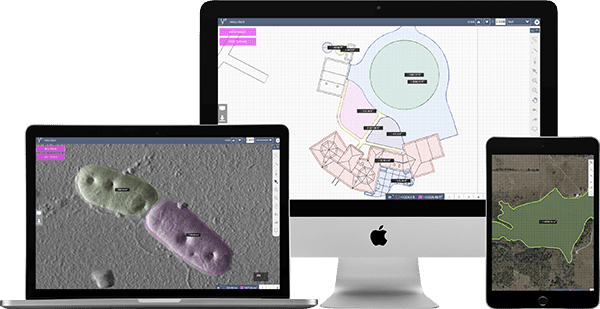
Draw over any shape.


Area Calculator
Easily Calculate Irregular Area drawn over Google Maps, Images, Photographs or CAD files
SketchAndCalc® is an irregular area calculator app for all manner of images containing irregular shapes.
Uniquely, the area calculator is capable of accurately calculating irregular areas of uploaded images, photographs or plans quickly. Using the area calculators autoscale tool, you can set the drawing scale of common image formats such as PNG, GIF, and JPEG, along with PDF’s. CAD formats like DXF and DWG used extensively by the architectural industry can be used to calculate area of irregular building floor plans and odd shaped engineering projects. Whereas designers using vector files can easily import an SVG, and calculate area of multiple odd shapes just by drawing their perimeter.


Irregular area’s containing fixed angles or curves are also easily calculated without complex geometry math.
Simply put, if you have an image you can upload, or a maps address to search, you can calculate the irregular area of the shape regardless of how complex it is just by drawing around the perimeter of the area. The app can even sum multiple area calculations together by way of drawing layers. After the first area has been calculated, a new drawing layer can be added, allowing for an unlimited number of area calculations to be performed.
Results of the area calculator app are displayed in imperial and metric systems, increasing the calculator’s utility. And removing the need to convert between different square area measurements, including Hectares to Acres.
This, alongside the calculator’s precise drawing tools and magnification, ensures that irregular area’s of every size are calculated quickly, and accurately.
The area calculator app is available on all modern web browsers alongside SketchAndCalc® for Android, iOS, Windows desktop, and macOS apps for those that need to calculate irregular area offline or in the field.


If regular polygon shapes with fixed angles and precise line lengths are needed, the drawing tools can snap to common angles, perfect squares, and circles.
Line lengths can also be manually edited using the keyboard, helpful if your irregular area has a straight side or length. And no irregular area calculator would be complete without a curve drawing tool for odd shapes, another unique feature of SketchAndCalc®. Many Google map area calculator apps allow searching of address, SketchAndCalc® takes it a step further to support searching of longitude and latitude coordinates. So whether your area is on agricultural land or sea, you’ll spend less time searching and more time calculating your irregular area.


Top reasons to use an area calculator

With SketchAndCalc, you can calculate the area and perimeter of any shape you draw or image you trace — from finding the area of a property using a satellite image,…
How using an area calculator can help with roofing jobs

Without utilizing the proper tools, trying to determine the proper area of a residential or commercial roofing space can be difficult. With various different angles and pitches, it’s nearly impossible…
Calculate Hair Loss in Millimetres

Take the stress out of getting multiple hair transplant quotes from specialists. Find out how many hair transplant grafts you’ll need to budget for using our Hair Loss Area Calculator….
Area calculators and the medical industry

Although it might not be the first field or industry you think of when considering reasons to use an area calculator, one of the most common uses of SketchAndCalc’s area…